TikTok Video & Photo Downloader
Tool to download TikTok video & photo Full HD 1080p without watermark
By using our service you accept our Terms of Service and Privacy Policy.
Tool to download TikTok video & photo Full HD 1080p without watermark
SnapTik.lt is the premier online TikTok video downloader engineered to download TikTok videos without watermark in Full HD 1080p and 4K quality. Follow this simple 3-step guide on your mobile or PC:
Open the TikTok application or visit tiktok.com on your browser. Find the video you want to save, tap the Share button at the bottom-right, and select Copy Link.
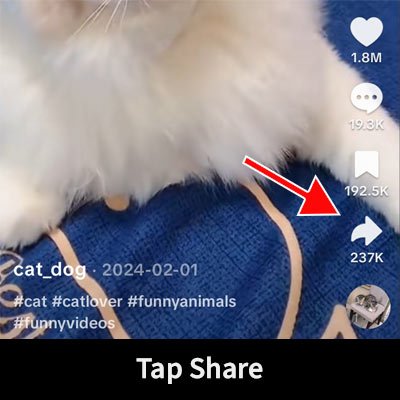
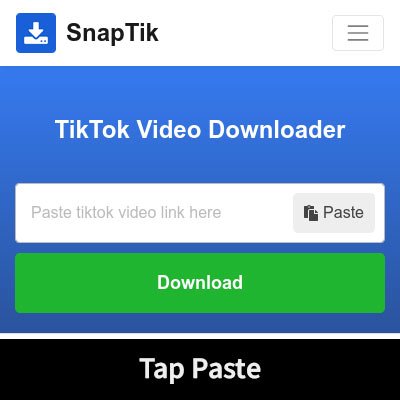
Open your web browser and navigate to SnapTik.lt. Paste the copied TikTok URL into the search box at the top of this page, then click the green Download button.
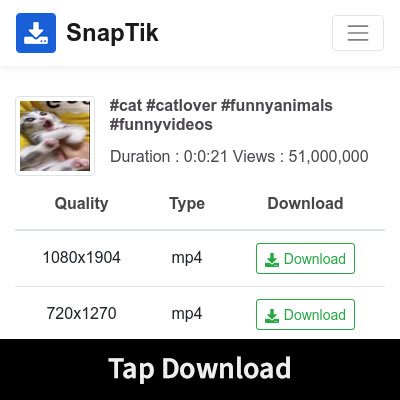
Our high-speed cloud engine removes the TikTok watermark instantly. Select Without Watermark (HD), Full HD 1080p, or extract the audio track as an MP3 file.
Compare SnapTik.lt against standard online video downloaders and mobile screen recording methods:
| Key Features & Performance | ⚡ SnapTik.lt | Traditional Downloaders | Screen Recording Apps |
|---|---|---|---|
| Watermark Removal | 100% Clean (Zero Logo / No Blur) | Ghost Watermarks / Blurred Edges | Watermark & UI Stays on Screen |
| Maximum Resolution | Original Full HD 1080p (60 FPS) | Downscaled to 720p / 480p | Compressed Phone Screen Resolution |
| TikTok to MP3 Extraction | Crystal Clear 320kbps MP3 Audio | Video Only (No MP3 Support) | Captures Background Mic Noise |
| App or Extension Required | None (100% Web Cloud Tool) | Requires APKs / Chrome Extensions | Heavy Screen Recorder App Needed |
| Daily Download Limits | Unlimited Free Downloads | Capped at 3 to 5 Videos Daily | Manual Time & Storage Limits |
| Download Speed & Proxy | Instant Direct CDN Streaming | 15-Second Ad Countdown Timers | Real-Time (Takes full video duration) |
| Cost & Hidden Charges | 100% Free Forever | Pushy Monthly Paid Subscriptions | Expensive In-App Purchases |
Engineered for content creators, social media managers, and everyday TikTok fans who demand top quality:
Our proprietary video engine strips both animated TikTok bouncing logos and creator usernames cleanly from source MP4 streams, leaving your video pristine.
Download the exact highest-bitrate video stream stored on TikTok's official servers. No downscaling, no recompression artifacts, and crisp 60FPS motion.
Extract viral trending sounds, music tracks, voiceovers, and TikTok audio in high-fidelity 320kbps MP3 format with a single click.
100% responsive design built to work seamlessly in Safari on iOS/iPadOS, Google Chrome on Android, Windows 11/10 PCs, and Apple macOS.
Never risk installing suspicious APK files, mobile apps, or browser add-ons. SnapTik.lt runs completely in the cloud through secure HTTPS.
No subscription paywalls, no credits, no daily limits, and no account signup required. Download as many TikTok videos as you desire anytime.
Step-by-step instructions customized for your specific operating system:
https://snaptik.lt.https://snaptik.lt.SnapTik.lt automatically resolves and processes all standard TikTok URL variations:
https://vt.tiktok.com/ZS9SXXwhGekvo/
https://vm.tiktok.com/ZM8SXXwhGekvo/
https://www.tiktok.com/@username/video/7670331236355245320
https://m.tiktok.com/v/7670331236355245320.html
Find clear answers to common questions about downloading TikTok videos without watermark:
Disclaimer: SnapTik.lt is an independent online tool and is not affiliated, authorized, or endorsed by TikTok, ByteDance Ltd., or any of their parent or subsidiary companies. Users are responsible for adhering to applicable copyright laws and content owner permissions.